
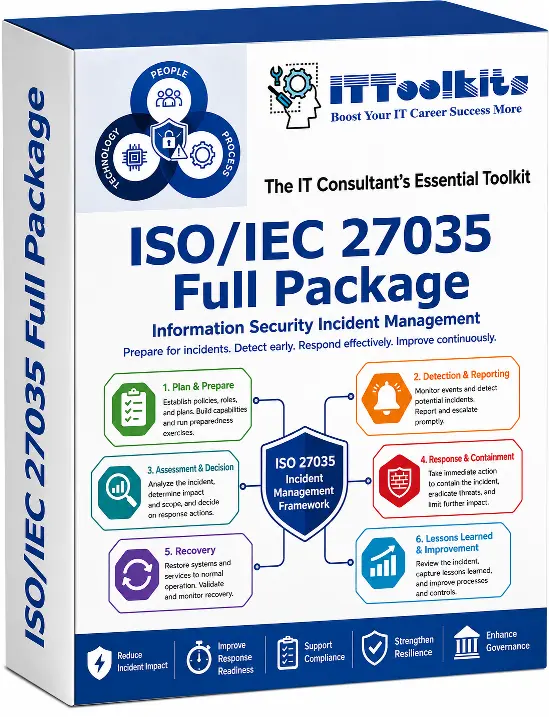
Information security incidents can disrupt operations, expose sensitive data, and create significant regulatory and reputational consequences. The ISO/IEC 27035:2024 Incident Management Toolkits provide a structured framework for preparing for, identifying, assessing, responding to, and learning from information security incidents.
The package supports the full incident lifecycle with policies, procedures, forms, registers, checklists, escalation workflows, communication records, evidence management resources, and reporting templates. These materials help teams coordinate responsibilities and apply a consistent incident handling process from initial reporting through recovery and lessons learned.
Using the toolkit helps organisations strengthen incident readiness, improve response consistency, support clear escalation and accountability, and maintain better audit evidence while aligning incident management practices with ISO/IEC 27035:2024.
Below is a list of documents you will find in the toolkit. Click on index file button to see which templates are included.
| Type | Files List |
|---|---|
 Part 1. Program Initiation & Governance Part 1. Program Initiation & Governance📌 Objective: To establish the implementation governance, sponsorship, roadmap, roles, communication channels, and project controls required to mobilize an ISO/IEC 27035:2024 incident management program effectively. | |
 | ISO IEC 27035 Implementation Project Charter.docx |
| Incident Management Program Scope Statement.docx |
| Executive Sponsorship Approval.docx |
| Incident Management Governance Model.docx |
| Incident Management Steering Committee Terms of Reference.docx |
| Project Communication Plan.docx |
| Implementation Meeting Minutes.docx |
 | Stakeholder Register.xlsx |
| Incident Management Program RACI Matrix.xlsx |
| Implementation Roadmap.xlsx |
| Project Risk and Issue Register.xlsx |
| Project Milestone Tracker.xlsx |
| Decision Log.xlsx |
| Action Item Tracker.xlsx |
 | Program Initiation Executive Briefing.pptx |
| ISO IEC 27035 Implementation Kickoff Presentation.pptx |
| Part 2. Current State Assessment & Gap Analysis 📌 Objective: To assess the organization's current incident management capabilities, identify gaps against ISO/IEC 27035:2024, and define prioritized remediation actions. | |
| Current State Incident Process Assessment.docx |
| Current Incident Response Capability Assessment.docx |
| Current SOC Capability Assessment.docx |
| Current CSIRT Capability Assessment.docx |
| Forensic Readiness Assessment.docx |
| Third Party Incident Management Assessment.docx |
| Gap Analysis Report.docx |
| ISO IEC 27035 Gap Assessment Checklist.xlsx |
| Incident Management Maturity Assessment.xlsx |
| Existing Policy and Procedure Review Checklist.xlsx |
| Incident Tooling Assessment.xlsx |
| Logging and Monitoring Capability Assessment.xlsx |
| Legal and Regulatory Requirement Mapping.xlsx |
| Business Unit Incident Readiness Survey.xlsx |
| Gap Remediation Plan.xlsx |
| Current State Assessment Findings Presentation.pptx |
| Gap Analysis Executive Summary Presentation.pptx |
| Part 3. Context, Scope & Requirement Definition 📌 Objective: To define organizational context, scope, interested parties, critical assets, regulatory obligations, objectives, and requirements for the incident management system. | |
| Organizational Context Analysis.docx |
| Incident Management Scope Definition.docx |
| Incident Management Requirement Matrix.docx |
| Internal and External Issues Register.xlsx |
| Interested Parties Register.xlsx |
| Business Process Dependency Mapping.xlsx |
| Critical Asset Register.xlsx |
| Crown Jewel Asset Register.xlsx |
| Information Asset Classification Register.xlsx |
| Critical Service Mapping.xlsx |
| Regulatory Obligation Register.xlsx |
| Contractual Incident Obligation Register.xlsx |
| Incident Management Objective Register.xlsx |
| Incident Management KPI and KRI Library.xlsx |
| Incident Management Scope and Context Presentation.pptx |
| Requirement Definition Workshop Presentation.pptx |
| Part 4. Policy Framework 📌 Objective: To establish a clear policy framework that governs incident reporting, monitoring, evidence handling, notifications, communications, and exception management. | |
| Information Security Incident Management Policy.docx |
| Incident Reporting Policy.docx |
| Security Event Monitoring Policy.docx |
| Vulnerability Reporting Policy.docx |
| Digital Evidence Handling Policy.docx |
| Crisis Communication Policy.docx |
| Data Breach Notification Policy.docx |
| Third Party Incident Notification Policy.docx |
| Law Enforcement Engagement Policy.docx |
| Media Communication Policy.docx |
| Whistleblowing and Anonymous Reporting Policy.docx |
| Acceptable Use Incident Reporting Addendum.docx |
| Policy Exception Request.docx |
| Policy Approval Record.xlsx |
| Policy Review Log.xlsx |
| Incident Management Policy Awareness Presentation.pptx |
| Executive Policy Approval Presentation.pptx |
| Part 5. Incident Management Framework & Process Design 📌 Objective: To design the incident management framework, lifecycle processes, operating procedures, interfaces, ownership, and controls needed for consistent incident handling. | |
| Incident Management Framework Document.docx |
| Incident Management Lifecycle Process.docx |
| Security Event Management Procedure.docx |
| Incident Detection Procedure.docx |
| Incident Reporting Procedure.docx |
| Incident Triage Procedure.docx |
| Incident Classification Procedure.docx |
| Incident Prioritization Procedure.docx |
| Incident Escalation Procedure.docx |
| Incident Response Procedure.docx |
| Incident Containment Procedure.docx |
| Incident Eradication Procedure.docx |
| Incident Recovery Procedure.docx |
| Incident Closure Procedure.docx |
| Lessons Learned Procedure.docx |
| Vulnerability Handling Procedure.docx |
| Major Incident Management Procedure.docx |
| Crisis Management Interface Procedure.docx |
| Business Continuity Interface Procedure.docx |
| Disaster Recovery Interface Procedure.docx |
| Process Control Mapping.xlsx |
| Procedure Ownership Matrix.xlsx |
| Process Interface Matrix.xlsx |
| Incident Management Framework Presentation.pptx |
| Incident Lifecycle Process Flow Presentation.pptx |
| Part 6. Organization, Roles & Competencies 📌 Objective: To define the incident management organization, roles, responsibilities, competency requirements, on call arrangements, and escalation contacts. | |
| Incident Management Organization Structure.docx |
| Incident Management Team Charter.docx |
| CSIRT Charter.docx |
| SOC Charter.docx |
| Incident Commander Role Description.docx |
| Incident Manager Role Description.docx |
| Technical Lead Role Description.docx |
| Forensic Analyst Role Description.docx |
| Communications Lead Role Description.docx |
| Legal Liaison Role Description.docx |
| Privacy Liaison Role Description.docx |
| Business Liaison Role Description.docx |
| HR Liaison Role Description.docx |
| Third Party Coordinator Role Description.docx |
| Executive Crisis Sponsor Role Description.docx |
| Duty Handover Checklist.docx |
| Incident Role Competency Matrix.xlsx |
| Incident Response Skills Matrix.xlsx |
| On Call Roster.xlsx |
| Escalation Contact Directory.xlsx |
| Incident Management Organization Model Presentation.pptx |
| Roles and Responsibilities Training Presentation.pptx |
| Part 7. Incident Classification, Taxonomy & Prioritizations 📌 Objective: To standardize incident taxonomy, classification, severity, impact, urgency, priority, SLA thresholds, and escalation criteria. | |
| Security Event Taxonomy.docx |
| Information Security Incident Taxonomy.docx |
| Incident Classification Decision Tree.docx |
| Major Incident Criteria.docx |
| Incident Category Matrix.xlsx |
| Incident Severity Matrix.xlsx |
| Incident Impact Assessment Matrix.xlsx |
| Incident Urgency Assessment Matrix.xlsx |
| Incident Priority Matrix.xlsx |
| Data Breach Classification Matrix.xlsx |
| Privacy Incident Classification Matrix.xlsx |
| Cyber Attack Type Classification.xlsx |
| Business Impact Scoring.xlsx |
| Incident SLA Matrix.xlsx |
| Escalation Threshold Matrix.xlsx |
| Incident Classification Training Presentation.pptx |
| Severity and Escalation Workshop Presentation.pptx |
| Part 8. Detection, Reporting & Intake 📌 Objective: To provide structured forms, intake channels, triage checklists, and registers for detecting, reporting, screening, and recording security events and incidents. | |
| Security Event Report Form.docx |
| Information Security Incident Report Form.docx |
| Suspected Data Breach Report Form.docx |
| Phishing Report Form.docx |
| Malware Incident Report Form.docx |
| Ransomware Incident Report Form.docx |
| Insider Threat Report Form.docx |
| Lost or Stolen Asset Report Form.docx |
| Unauthorized Access Report Form.docx |
| Third Party Incident Notification Form.docx |
| Customer Incident Notification Intake Form.docx |
| Incident Hotline Script.docx |
| Incident Email Intake.docx |
| Incident Ticket Intake.docx |
| Initial Incident Screening Checklist.docx |
| Initial Incident Triage Checklist.docx |
| False Positive Review.docx |
| Incident Intake Register.xlsx |
| Detection Source Register.xlsx |
| Initial Triage Tracker.xlsx |
| Incident Reporting Awareness Presentation.pptx |
| Detection and Intake Process Training Presentation.pptx |
| Part 9. Incident Response Planning 📌 Objective: To develop scenario based incident response plans and playbooks covering major cyber threats, data breaches, third party incidents, cloud incidents, and executive response. | |
| Incident Response Plan.docx |
| Major Incident Response Plan.docx |
| Cyber Crisis Response Plan.docx |
| Data Breach Response Plan.docx |
| Ransomware Response Plan.docx |
| Phishing Response Plan.docx |
| Malware Response Plan.docx |
| DDoS Response Plan.docx |
| Business Email Compromise Response Plan.docx |
| Insider Threat Response Plan.docx |
| Cloud Security Incident Response Plan.docx |
| SaaS Incident Response Plan.docx |
| Endpoint Compromise Response Plan.docx |
| Network Intrusion Response Plan.docx |
| Web Application Attack Response Plan.docx |
| Supply Chain Incident Response Plan.docx |
| Third Party Incident Response Plan.docx |
| OT ICS Incident Response Plan.docx |
| Executive Incident Response Playbook.docx |
| Incident Response Plan Maintenance Log.docx |
| Incident Response Plan Coverage Matrix.xlsx |
| Incident Response Plan Review Tracker.xlsx |
| Incident Response Planning Workshop Presentation.pptx |
| Executive Incident Response Plan Briefing.pptx |
| Part 10. Communications & Notification 📌 Objective: To establish communication and notification templates for internal stakeholders, executives, regulators, customers, suppliers, media, insurers, and law enforcement. | |
| Incident Communication Plan.docx |
| Internal Incident Notification.docx |
| Executive Incident Briefing.docx |
| Board Incident Briefing.docx |
| Crisis Communication Script.docx |
| Employee Incident Advisory.docx |
| Customer Notification.docx |
| Regulator Notification.docx |
| Law Enforcement Notification.docx |
| Cyber Insurance Notification.docx |
| Third Party Notification.docx |
| Supplier Notification.docx |
| Media Holding Statement.docx |
| Press Release.docx |
| Public FAQ.docx |
| Call Center Briefing.docx |
| Incident Status Update.docx |
| Incident War Room Agenda.docx |
| Stakeholder Communication Log.xlsx |
| Communication Approval Log.xlsx |
| Notification Timeline Tracker.xlsx |
| Crisis Communication Briefing Presentation.pptx |
| Board Incident Communication Presentation.pptx |
| Part 11. Evidence, Forensics & Chain of Custody 📌 Objective: To ensure digital evidence, forensic activities, chain of custody, legal holds, evidence transfer, retention, and disposal are managed in a controlled and defensible manner. | |
| Digital Evidence Handling Procedure.docx |
| Evidence Collection Form.docx |
| Chain of Custody Form.docx |
| Forensic Imaging Request Form.docx |
| Forensic Acquisition Checklist.docx |
| Endpoint Evidence Collection Checklist.docx |
| Server Evidence Collection Checklist.docx |
| Cloud Evidence Collection Checklist.docx |
| Network Evidence Collection Checklist.docx |
| Email Evidence Collection Checklist.docx |
| Log Preservation Request.docx |
| Legal Hold Request.docx |
| Evidence Transfer Form.docx |
| Forensic Analysis Report.docx |
| Malware Analysis Report.docx |
| Evidence Disposal Approval.docx |
| Evidence Register.xlsx |
| Evidence Storage Log.xlsx |
| Root Cause Evidence Mapping.xlsx |
| Evidence Retention Schedule.xlsx |
| Digital Evidence Handling Training Presentation.pptx |
| Forensic Readiness Briefing Presentation.pptx |
| Part 12. Legal, Privacy & Regulatory Compliance 📌 Objective: To support legal, privacy, contractual, regulatory, insurance, and breach notification assessments throughout the incident lifecycle. | |
| Legal Incident Assessment.docx |
| Privacy Incident Assessment.docx |
| Personal Data Breach Assessment.docx |
| Data Subject Impact Assessment.docx |
| Cross Border Notification Assessment.docx |
| Legal Privilege Protocol.docx |
| Law Enforcement Engagement Record.docx |
| Cyber Insurance Claim Notification.docx |
| Data Protection Officer Briefing.docx |
| Legal Counsel Briefing.docx |
| Litigation Hold Notice.docx |
| Regulatory Notification Decision Matrix.xlsx |
| Contractual Notification Obligation Matrix.xlsx |
| Breach Notification Timeline Tracker.xlsx |
| Regulator Communication Log.xlsx |
| Incident Regulatory Compliance Register.xlsx |
| Legal and Privacy Incident Briefing Presentation.pptx |
| Regulatory Notification Decision Presentation.pptx |
| Part 13. Third Party & Multi Organization Coordination 📌 Objective: To coordinate incident response activities with suppliers, managed service providers, cloud providers, outsourced SOCs, and other external stakeholders. | |
| Third Party Incident Management Procedure.docx |
| Supplier Incident Notification Requirement.docx |
| Third Party Incident Reporting Form.docx |
| Joint Incident Response Plan.docx |
| Multi Organization Coordination Plan.docx |
| Managed Service Provider Incident Interface.docx |
| Cloud Service Provider Incident Interface.docx |
| Outsourced SOC Incident Interface.docx |
| Third Party Evidence Sharing Agreement.docx |
| Joint Communication Approval.docx |
| Supplier Incident Post Mortem.docx |
| Third Party Corrective Action Plan.docx |
| Supplier Incident Performance Review.docx |
| Supplier Incident Escalation Matrix.xlsx |
| Third Party Contact Directory.xlsx |
| External Stakeholder Coordination Matrix.xlsx |
| Third Party Incident SLA Tracker.xlsx |
| Multi Organization Incident Coordination Presentation.pptx |
| Supplier Incident Management Briefing.pptx |
| Part 14. Technology, Tools & Records 📌 Objective: To define the tools, technology architecture, records, dashboards, log sources, detection use cases, automation requirements, and incident data management practices. | |
| Incident Management Tool Requirement Specification.docx |
| SOAR Automation Requirement.docx |
| Case Management Configuration Checklist.docx |
| Incident Ticketing Workflow.docx |
| Incident Dashboard Requirement.docx |
| SIEM Use Case Register.xlsx |
| Alert Rule Register.xlsx |
| Detection Engineering Backlog.xlsx |
| Log Source Inventory.xlsx |
| Critical Log Source Coverage Matrix.xlsx |
| Log Retention Matrix.xlsx |
| Threat Intelligence Source Register.xlsx |
| IOC Register.xlsx |
| Blocklist Request Form.xlsx |
| Forensic Tool Register.xlsx |
| Evidence Repository Access Register.xlsx |
| Incident Data Retention Register.xlsx |
| Incident Record Register.xlsx |
| Incident Metrics Data Dictionary.xlsx |
| Incident Technology Architecture Presentation.pptx |
| Incident Dashboard Design Presentation.pptx |
| Part 15. Incident Execution & Operational Control 📌 Objective: To provide operational templates for managing live incidents, action plans, situation reports, timelines, decisions, tasks, containment, eradication, and recovery activities. | |
| Incident Case File.docx |
| Incident Action Plan.docx |
| Incident Status Report.docx |
| Situation Report.docx |
| Shift Handover.docx |
| Technical Investigation Log.docx |
| Incident Closure Checklist.docx |
| Incident Timeline.xlsx |
| Incident War Room Log.xlsx |
| Incident Decision Log.xlsx |
| Incident Task Tracker.xlsx |
| Containment Action Log.xlsx |
| Eradication Action Log.xlsx |
| Recovery Action Log.xlsx |
| Business Impact Update.xlsx |
| Affected Asset List.xlsx |
| Affected User List.xlsx |
| Affected Data Set Register.xlsx |
| IOC Tracking.xlsx |
| Remediation Tracker.xlsx |
| Major Incident Situation Briefing.pptx |
| Executive Incident Update Presentation.pptx |
| Part 16. Recovery, Restoration & Business Resumption 📌 Objective: To guide recovery, restoration, validation, residual risk acceptance, business resumption, temporary controls, and return to normal approval after incidents. | |
| Recovery Plan.docx |
| System Restoration Checklist.docx |
| Service Restoration Checklist.docx |
| Backup Validation Checklist.docx |
| Recovery Readiness Checklist.docx |
| Recovery Approval Form.docx |
| Business Service Resumption Checklist.docx |
| Post Recovery Monitoring Plan.docx |
| Residual Risk Acceptance Form.docx |
| Temporary Control Approval.docx |
| Recovery Communication.docx |
| Recovery Validation Report.docx |
| Return to Normal Approval.docx |
| Post Incident Stabilization Checklist.docx |
| Compensating Control Register.xlsx |
| Recovery Status Tracker.xlsx |
| Restoration Validation Tracker.xlsx |
| Recovery Status Briefing Presentation.pptx |
| Business Resumption Executive Presentation.pptx |
| Part 17. Metrics, Reporting & Management Review 📌 Objective: To monitor incident performance through metrics, dashboards, trends, reports, management reviews, action tracking, and continual improvement insights. | |
| Monthly Incident Report.docx |
| Quarterly Incident Management Report.docx |
| Incident Trend Analysis Report.docx |
| Recurring Incident Analysis.docx |
| Regulatory Notification Performance Report.docx |
| Management Review Minutes.docx |
| Incident KPI Dashboard.xlsx |
| Incident KRI Dashboard.xlsx |
| Mean Time to Detect Tracker.xlsx |
| Mean Time to Respond Tracker.xlsx |
| Mean Time to Contain Tracker.xlsx |
| Mean Time to Recover Tracker.xlsx |
| Incident Volume Trend.xlsx |
| Incident Severity Trend.xlsx |
| Incident Category Trend.xlsx |
| SLA Compliance Report.xlsx |
| Training Completion Report.xlsx |
| Exercise Performance Report.xlsx |
| Management Action Tracker.xlsx |
| Executive Incident Management Dashboard.pptx |
| Board Incident Management Report.pptx |
| Management Review Presentation.pptx |
| Part 18. Audit, Assurance & Compliance 📌 Objective: To support internal audit, control testing, evidence review, corrective actions, compliance assurance, and certification readiness for incident management practices. | |
| Internal Audit Plan.docx |
| Audit Interview Guide.docx |
| Evidence Request List.docx |
| Nonconformity Report.docx |
| Corrective Action Verification.docx |
| Policy Compliance Review.docx |
| Procedure Compliance Review.docx |
| Incident Record Quality Review.docx |
| Incident Closure Quality Review.docx |
| Third Party Incident Compliance Review.docx |
| Audit Report.docx |
| Certification Readiness Assessment.docx |
| ISO IEC 27035 Internal Audit Checklist.xlsx |
| Incident Management Control Testing.xlsx |
| Audit Sampling Plan.xlsx |
| Audit Findings Register.xlsx |
| Compliance Obligation Testing.xlsx |
| Audit Follow Up Tracker.xlsx |
| Audit Opening Meeting Presentation.pptx |
| Audit Closing Meeting Presentation.pptx |
| Certification Readiness Presentation.pptx |
Price: $369.00

Secure payment via PayPal. Instant digital delivery after successful payment.


| Date File Updated | 25/03/2025 |
|---|---|
| File Format | pdf, xls, doc |
| No. of files | 363 Files, 18 Folders |
| File download size | 69.72 MB (.rar) |
| Language |  English English |
This document has been certified by a professional.
100% customizable. You can edit our templates as needed.
Instant download after completing your order.
We recommend downloading this file onto your computer.
Your payment information is processed securely.
After payment, if you require an invoice, please email us.
Support contact: supports@it-toolkits.org